Can I Use a Travel eSIM and My Home SIM at the Same Time?
Yes. On any dual SIM phone, your home SIM and a travel eSIM run at the same time — two lines, two numbers, both live. The home line keeps your number for calls and verification texts; the eSIM carries your data. What decides whether this works smoothly isn't the hardware. It's two settings you pick before you fly, and one of them is a switch people forget.
How do I keep my home number working for texts and bank codes while data runs on the eSIM?
Set your home SIM as the default line for voice and SMS, and the travel eSIM as the default line for mobile data. That's the whole split. Verification codes keep arriving on your home number because SMS travels over the cellular voice network, not your data connection — no eSIM data needed for a bank code to land.
The exception: app-based codes (WhatsApp, Google, some banking apps) need data to arrive. They'll come through the eSIM's data, which is fine as long as the app is registered to your home number. Keep your home line switched on for SMS, and check what your carrier charges for receiving texts abroad before you assume it's free.
Will my home carrier charge roaming fees if I leave the home SIM switched on?
Possibly — and this is where most surprise bills come from. Incoming SMS is usually free or pennies abroad, but outgoing texts, answered calls, and even a few kilobytes of background data can bill at full roaming rates.
Turn off Data Roaming on the home line in your phone settings, and make sure the eSIM is the selected data line. On iPhone, also switch off "Allow Cellular Data Switching" so the phone can't quietly fail over to your home SIM when the eSIM signal drops. One more trap: some carriers bill you for a call that goes to voicemail even when you never pick up. UROCOMM can't quote your carrier's rates, so confirm them directly.
Should I install the UROCOMM eSIM at home or wait until I land?
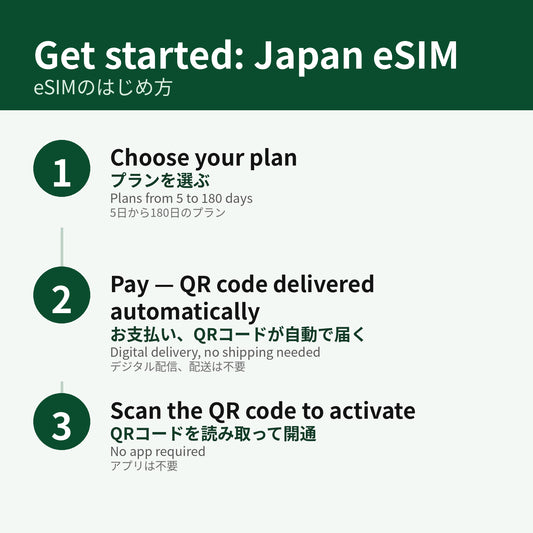
Install the profile at home on Wi-Fi, then start the plan only when you arrive at your destination. That's UROCOMM's default rule for a reason: activating early can start your validity period before you've left, and it can trigger roaming charges if the eSIM grabs a network at home.
Installation itself takes a few minutes — usually under five on decent Wi-Fi, though UROCOMM doesn't publish a guaranteed install time. Validity also varies: UROCOMM doesn't publish one catalog-wide day count, so the number of days on your plan page is the one that applies to you. Our walkthrough on how long a travel eSIM takes to activate covers what happens between scanning the QR code and seeing signal bars.
Does my phone support a home SIM and an eSIM running together?
Most phones sold from roughly 2018–2020 onward do. On iPhone that means iPhone XS, XR and later; on Google it's Pixel 3a and later; on Samsung it's Galaxy S20 and later. Two eSIMs active at once is a narrower club — that needs iPhone 13 or later.
Two exceptions bite travelers. A carrier-locked phone will often refuse a foreign eSIM outright, so check your lock status before ordering. And some dual-SIM models sold in certain markets are dual physical SIM only, with no eSIM chip inside — the phone looks capable until the profile won't install. Our guide to switching between eSIM and physical SIM walks through the toggles line by line.
My home SIM lost signal after I installed the eSIM — what should I check?
Start with the line toggle. In your SIM settings, confirm the home line is switched on, still set as the default for voice and SMS, and still labeled the way you expect. A restart clears most of these.
If the line is gone entirely, the profile may have overwritten your physical SIM's slot assignment — re-seat the card and check again. If your home number was recently converted to an eSIM by your carrier, the physical card stops working by design; you need that eSIM active instead. And if the phone reports "SIM not supported," you're likely dealing with a carrier lock, not a UROCOMM problem.
What if my phone can't hold two lines at all?
Use a portable hotspot and leave your phone's home SIM exactly where it is. Your phone connects to the hotspot over Wi-Fi, your home number stays reachable for calls and texts, and no data ever touches your carrier's roaming rates.
UROCOMM's Japan WiFi 6 portable travel hotspot needs no SIM at all — useful if you land at Narita late and don't want to debug phone settings in the arrivals hall. Traveling wider? The global WiFi 6 hotspot model is listed for 110 countries. You can browse the rest in our mobile WiFi device collection if a single-country eSIM doesn't fit your route.
Can I get a refund if dual SIM turns out not to work on my phone?
Ask before you activate anything. UROCOMM doesn't publish a blanket refund window, so email service@urocomm.com with your order number and your phone model, and support will tell you what applies to your specific plan. An unactivated profile is a very different situation from one that's already started its validity period.
This is why the compatibility check is worth two minutes at checkout rather than two hours at the airport. If you're still choosing a plan, the travel eSIM collection lists coverage and validity per product so you can match it to your device and trip length.
Need help?
Email service@urocomm.com with your phone model, your destination, and the order number if you have one. Support can confirm whether your device handles dual SIM with an eSIM, and which plan fits your dates. Start with the travel eSIM collection — pick a plan, install it at home, and only start it once you've landed.